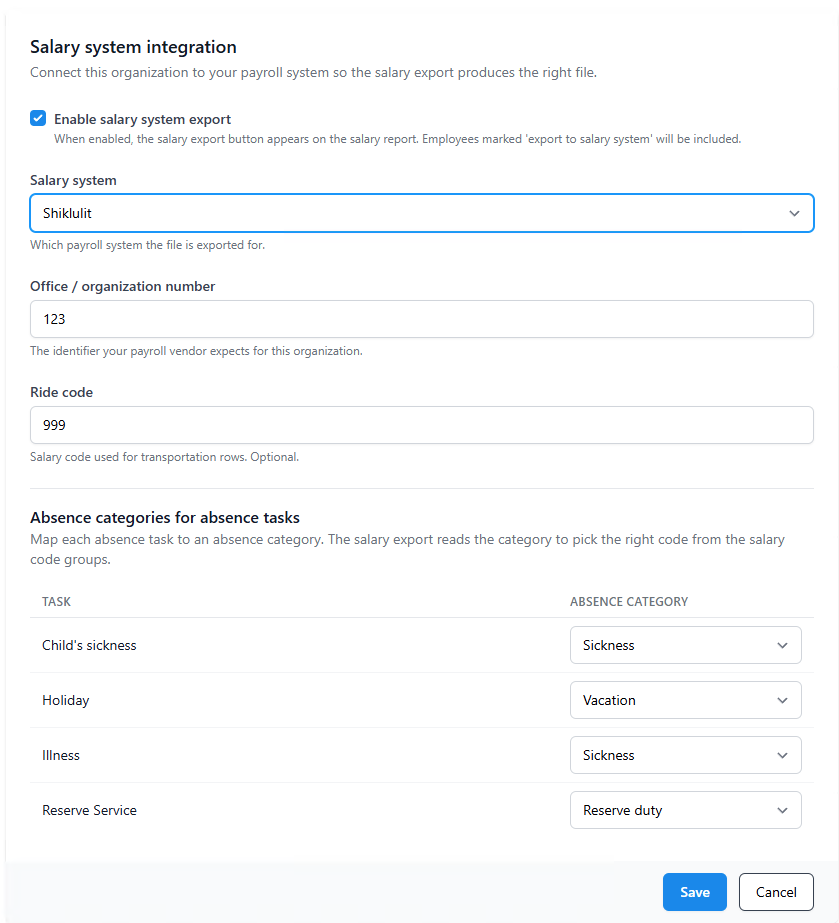
Open System management > Salary integration. This is where you tell ProperTime which payroll system you use.
Fields on this page:
- Enabled. Turns on the file-generation button in the salary report. Off means no file gets produced.
- Payroll system. Pick the one your accountant uses (Michpal, Hashavim, MALAM, Trio, and others).
- Organization number in salary program. Your office or customer number with the payroll provider. It goes into every row of the file.
- Use Employee ID instead of ID number. Picks which value goes into the employee column of the file. Default is national ID. Turn this on only if your payroll provider asked for the internal employee number. The checkbox is hidden for payroll systems that don't read this flag.
- Ride code. Optional. Use it if your payroll provider expects daily transportation under a specific code.
Click Save.
Once this is saved, the next step is to build your salary code groups.
Back to the payroll integration overview.
Was this article helpful?
That’s Great!
Thank you for your feedback
Sorry! We couldn't be helpful
Thank you for your feedback
Feedback sent
We appreciate your effort and will try to fix the article