A sequence is a chain of codes that changes across consecutive days of the same absence. Example: sick days 1 to 3 use one code, days 4 and onwards use another. Most organizations don't need this. Skip it if your payroll provider doesn't ask for it.
Open System management > Salary code sequences.
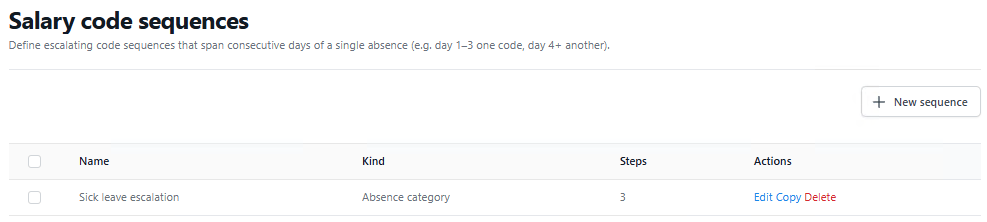
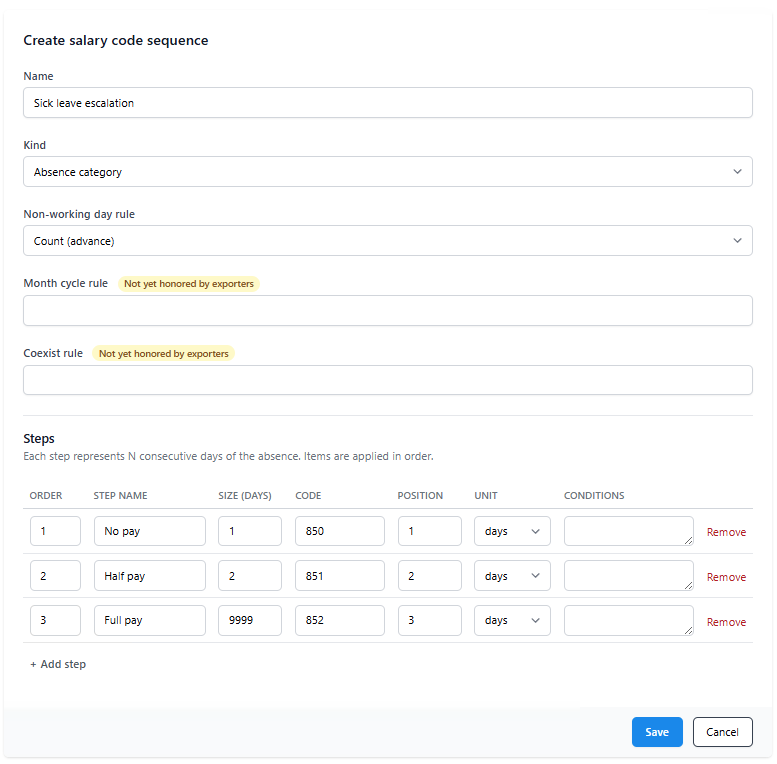
Click New sequence. Set:
- Name. For your reference.
- Kind. What the sequence applies to (hours, absence category, day type).
Then add steps. Each step is one phase of the sequence:
- Size in days for this phase.
- Code to use during the phase.
- Position in file (Trio only).
Steps run in order. Phase 1 covers days 1 through its size, phase 2 covers the next chunk, and so on.
Click Save.
To attach a sequence to a salary code group row, open the row's Advanced dialog and pick the sequence from the dropdown.

Worked example: Israeli sick leave
Israeli sick-leave law: day 1 has no pay, days 2 to 3 are half pay, day 4 onwards is full pay. Suppose your payroll system uses different codes for each phase:
- No pay: code 850
- Half pay: code 851
- Full pay: code 852
Create a sequence with Kind = Absence category and three steps:
| Order | Name | Size (days) | Code |
|---|---|---|---|
| 1 | No pay | 1 | 850 |
| 2 | Half pay | 2 | 851 |
| 3 | Full pay | 9999 | 852 |
A large size on the last step (9999) effectively covers everything from day 4 onwards.
Attach this sequence to the Sick leave row in your default salary code group.
An employee with 7 sick days that month produces three rows in the file: code 850 quantity 1, code 851 quantity 2, code 852 quantity 4. If they took only 2 sick days, two rows: code 850 quantity 1 and code 851 quantity 1. Step 3 never kicks in.
Back to the payroll integration overview.
Was this article helpful?
That’s Great!
Thank you for your feedback
Sorry! We couldn't be helpful
Thank you for your feedback
Feedback sent
We appreciate your effort and will try to fix the article